> ## Documentation Index
> Fetch the complete documentation index at: https://statsig-4b2ff144-serverless-cloudflare.mintlify.site/llms.txt
> Use this file to discover all available pages before exploring further.
# Android On Device Evaluation SDK
> Statsig's Android SDK for on-device evaluation.
export const StatsigUserNotes = ({sdkName}) => <>
{sdkName &&
For the {sdkName} On-Device Evaluation SDK, you pass the `StatsigUser` object {sdkName === "JavaScript" ? "into" : "directly into"} each evaluation method (`checkGate`, `getConfig`, etc.) rather than during initialization.
}
Unlike precomputed evaluation SDKs, the on-device evaluation SDK does not have an `updateUser` method since it evaluates gates/configs/experiments in real-time for any user object you pass in.
;
Source code: statsig-io/android-local-eval
Statsig's normal (remote evaluation) SDKs are recommended for most client applications. Understand the use case and privacy risks by reading the [On-Device Eval SDK overview](/client/onDevice). On-device evaluation SDKs are for Enterprise & Pro Tier only.
These SDKs use a different paradigm than their precomputed counterparts: [JS](/client/javascript-sdk), [Android](/client/Android), [iOS](/client/iosClientSDK), they behave more like Server SDKs. Rather than requiring a user up front, you can check gates/configs/experiments for any set of user properties, because the SDK downloads a complete representation of your project and evaluates checks in real time.
### Pros
* No need for a network request when changing user properties - just check the gate/config/experiment locally
* Can bring your own CDN or synchronously initialize with a preloaded project definition
* Lower latency to download configs cached at the edge, rather than evaluated for a given user (which cannot be cached as much)
### Cons
* Entire project definition is available client side - the names and configurations of all experiments and feature flags accessible by your client key are exposed. See our [client key with server permission best practices](/sdk-keys/api-keys/#client-keys-with-server-permissions)
* Payload size is strictly larger than what is required for the traditional SDKs
* Evaluation performance is slightly slower - rather than looking up the value, the SDK must actually evaluate targeting conditions and an allocation decision
* Does not support ID list segments with > 1000 IDs
* Does not support IP or User Agent based checks (Browser Version/Name, OS Version/Name, IP, Country)
## Set Up the SDK
You can install the SDK using JitPack. See the latest version and installation steps at [https://jitpack.io/#statsig-io/android-local-eval](https://jitpack.io/#statsig-io/android-local-eval).
Next, initialize the SDK with a client SDK key from the ["API Keys" tab on the Statsig console](https://console.statsig.com/api_keys). These keys are safe to embed in a client application.
Along with the key, pass in a [User Object](#statsig-user) with the attributes you'd like to target later on in a gate or experiment.
For On-Device Evaluation, you'll need to add the **"Allow Download Config Specs"** scope. Client keys, by default, are not able to download the project definition for on-device evaluation.
While client keys are safe to include, Server and Console keys should always be kept private.
When creating a new client key, select **"Allow Download Config Specs"**
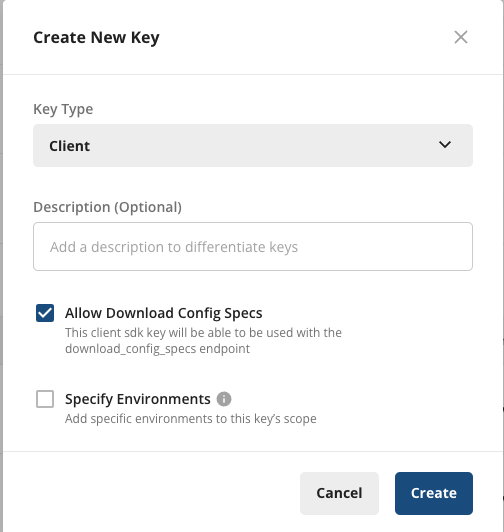 To add the scope to an existing key, under **Project Settings** > **API Keys** > **Client API Keys**, select **Actions** > **Edit Scopes**, and select **"Allow Download Config Specs"**, then **Save**.
 ```java Java theme={null}
import com.statsig.androidlocalevalsdk.*;
// ...
android.app.Application app = // ref to your Application instance
StatsigOptions opts = new StatsigOptions();
opts.setEnvironmentParameter("tier", "staging");
StatsigClient client = Statsig.INSTANCE.getClient();
client.initializeAsync(
app,
"client-YOUR_CLIENT_SDK_KEY",
new IStatsigCallback() {
@Override
public void onStatsigInitialize(@NotNull InitializationDetails initDetails) {
// Statsig Ready
}
@Override
public void onStatsigInitialize() {
// deprecated
}
},
opts
);
// or, create your own instance of StatsigClient
StatsigClient client = new StatsigClient();
client.initializeAsync(...);
```
```kotlin Kotlin theme={null}
import com.statsig.androidlocalevalsdk.*
// ...
val opts = StatsigOptions()
opts.setEnvironmentParameter("tier", "staging")
Statsig.client.initializeAsync(
application, // ref to your Application instance
"client-YOUR_CLIENT_SDK_KEY",
object : IStatsigCallback {
override fun onStatsigInitialize(initDetails: InitializationDetails) {
// Statsig Ready
}
override fun onStatsigInitialize() {
// deprecated
}
},
opts
)
// or, create your own instance of StatsigClient
val client = StatsigClient()
client.initializeAsync(...)
```
### Synchronous Initialization
```kotlin theme={null}
import com.statsig.androidlocalevalsdk.*
// (optional) Configure the SDK if needed
val opts = StatsigOptions()
opts.environment.tier = "staging"
val specs = "..." // JSON string of your configurations
let details = Statsig.client.initializeSync(application, "client-YOUR_CLIENT_SDK_KEY", specs, opts)
```
It is possible to configure the SDK to use cached values if they are newer than the local file.
This can be useful if you ship your app with a local file, but would like it to only be used for the first session.
In the following example, the SDK will only use initialSpecs if there is no cache or if the cache is older than initialSpecs.
```kotlin theme={null}
val options = StatsigOptions()
options.useNewerCacheValuesOverProvidedValues = true
Statsig.client.initializeSync(
application,
"client-YOUR_CLIENT_SDK_KEY",
specs,
options
)
```
You can get a copy of your current specs data by visiting: `https://api.statsigcdn.com/v1/download_config_specs/client-{YOUR_SDK_KEY}.json`
## Working with the SDK
### Checking a Feature Flag/Gate
Now that your SDK is initialized, let's check a [**Feature Gate**](/feature-flags/overview). Feature Gates can be used to create logic branches in code that can be rolled out to different users from the Statsig Console. Gates are always **CLOSED** or **OFF** (think `return false;`) by default.
```java Java theme={null}
StatsigUser user = new StatsigUser("a-user");
StatsigClient client = Statsig.INSTANCE.getClient();
if (client.checkGate(user, "new_homepage_design")) {
// Gate is on, show new home page
} else {
// Gate is off, show old home page
}
```
```kotlin Kotlin theme={null}
val user = StatsigUser("user_id")
if (Statsig.client.checkGate(user, "new_homepage_design")) {
// Gate is on, show new home page
} else {
// Gate is off, show old home page
}
```
### Reading a Dynamic Config
Feature Gates can be very useful for simple on/off switches, with optional but advanced user targeting. However, if you want to be able send a different set of values (strings, numbers, and etc.) to your clients based on specific user attributes, e.g. country, **Dynamic Configs** can help you with that. The API is very similar to Feature Gates, but you get an entire json object you can configure on the server and you can fetch typed parameters from it. For example:
```java Java theme={null}
StatsigUser user = new StatsigUser("a-user");
StatsigClient client = Statsig.INSTANCE.getClient();
DynamicConfig config = client.getConfig(user, "awesome_product_details");
// The 2nd parameter is the default value to be used in case the given parameter name does not exist on
// the Dynamic Config object. This can happen when there is a typo, or when the user is offline and the
// value has not been cached on the client.
String itemName = config.getString("product_name", "Awesome Product v1");
Double price = config.getDouble("price", 10.0);
Boolean shouldDiscount = config.getBoolean("discount", false);
```
```kotlin Kotlin theme={null}
val user = StatsigUser("user_id")
val config = Statsig.client.getConfig(user, "awesome_product_details")
// The 2nd parameter is the default value to be used in case the given parameter name does not exist on
// the Dynamic Config object. This can happen when there is a typo, or when the user is offline and the
// value has not been cached on the client.
val itemName = config.getString("product_name", "Awesome Product v1")
val price = config.getDouble("price", 10.0)
val shouldDiscount = config.getBoolean("discount", false)
```
### Getting a Layer/Experiment
Then we have **Layers/Experiments**, which you can use to run A/B/n experiments. We offer two APIs, but we recommend the use of [layers](/layers) to enable quicker iterations with parameter reuse.
```java Java theme={null}
StatsigUser user = new StatsigUser("a-user");
StatsigClient client = Statsig.INSTANCE.getClient();
// Values via getLayer
Layer layer = client.getLayer(user, "user_promo_experiments")
String promoTitle = layer.getString("title", "Welcome to Statsig!");
Double discount = layer.getDouble("discount", 0.1);
// or, via getExperiment
DynamicConfig titleExperiment = client.getExperiment(user, "new_user_promo_title");
DynamicConfig priceExperiment = client.getExperiment(user, "new_user_promo_price");
String promoTitle = titleExperiment.getString("title", "Welcome to Statsig!");
Double discount = priceExperiment.getDouble("discount", 0.1);
...
Double price = msrp * (1 - discount);
```
```kotlin Kotlin theme={null}
val user = StatsigUser("user_id")
// Values via getLayer
val layer = Statsig.client.getLayer(user, "user_promo_experiments")
val promoTitle = layer.getString("title", "Welcome to Statsig!")
val discount = layer.getDouble("discount", 0.1)
// or, via getExperiment
val titleExperiment = Statsig.client.getExperiment(user, "new_user_promo_title")
val priceExperiment = Statsig.client.getExperiment(user, "new_user_promo_price")
val promoTitle = titleExperiment.getString("title", "Welcome to Statsig!")
val discount = priceExperiment.getDouble("discount", 0.1)
...
val price = msrp * (1 - discount);
```
### Logging an Event
Now that you have a Feature Gate or an Experiment set up, you may want to track some custom events and see how your new features or different experiment groups affect these events. This is super easy with Statsig - simply call the Log Event API for the event, and you can additionally provide some value and/or an object of metadata to be logged together with the event:
```java Java theme={null}
StatsigUser user = new StatsigUser("user_id");
StatsigClient client = Statsig.INSTANCE.getClient();
client.logEvent(user, "purchase", 2.99, Map.of("item_name", "remove_ads"));
```
```kotlin Kotlin theme={null}
val user = StatsigUser("user_id")
Statsig.client.logEvent(user, "purchase", 2.99, mapOf("item_name" to "remove_ads"))
```
### Code Examples
Working sample apps are available in the repository:
* [Java & Kotlin Examples](https://github.com/statsig-io/android-local-eval/tree/main/samples)
## Statsig User
You need to provide a StatsigUser object to check/get your configurations. You should pass as much
information as possible in order to take advantage of advanced gate and config conditions.
Most of the time, the `userID` field is needed in order to provide a consistent experience for a given
user (see [logged-out experiments](/guides/first-device-level-experiment) to understand how to correctly run experiments for logged-out
users).
Besides `userID`, we also have `email`, `ip`, `userAgent`, `country`, `locale` and `appVersion` as top-level fields on
StatsigUser. In addition, you can pass any key-value pairs in an object/dictionary to the `custom` field and be able to
create targeting based on them.
Once the user logs in or has an update/changed, make sure to call `updateUser`
with the updated `userID` and/or any other updated user attributes:
### Setting a Global User
To avoid needing to pass the user object to every single evaluation call, you can set a global user. Then, when checking a gate/experiment/layer, provide "null" for the user to use the global user.
This user will be used for all evaluations unless otherwise specified.
```kotlin theme={null}
Statsig.client.setGlobalUser(myGlobalUser)
Statsig.client.checkGate(null, "my_gate") // <- Will use myGlobalUser
Statsig.client.checkGate(StatsigUser(userID: "user-123"), "my_gate") // <- Will NOT use myGlobalUser
```
## Statsig Options
You can pass in an optional parameter `options` in addition to `sdkKey` and `user` during initialization to customize the Statsig client.
The endpoint to use for downloading config spec network requests. You should not need to override this (unless you have another API that implements the Statsig API endpoints).
The endpoint to use for log events. You should not need to override this (unless you have another API that implements the Statsig API endpoints).
Milliseconds to wait for the initial network request before calling the completion block. The Statsig client will return either cached values (if any) or default values if checkGate/getConfig/getExperiment is called before the initial network request completes. Set to `0` to wait indefinitely for the latest values.
Overrides the `stableID` in the SDK that is set for the user.
Whether or not the SDK should block on loading saved values from disk.
Provide the `download_config_specs` response values directly to the Android SDK to synchronously initialize the client. You can get a copy of your current specs data by visiting: `https://api.statsigcdn.com/v1/download_config_specs/client-{YOUR_SDK_KEY}.json`
Prevent the SDK from sending useful debug information to Statsig.
#### Methods
* **setTier | setEnvironmentParameter | getEnvironment**
* Used to signal the environment tier the user is currently in.
* `setTier` can be PRODUCTION, STAGING or DEVELOPMENT. e.g. passing in a value of `Tier.STAGING` will allow your users to pass any condition that pass for the staging environment tier, and fail any condition that only passes for other environment tiers.
* `setEnvironmentParameter` can be used for custom tiers, eg `options.setEnvironmentParameter("tier", "test")`
## Lifecycle & Advanced Usage
## Shutting Statsig Down
In order to save users' data and battery usage, as well as prevent logged events from being dropped, we keep event logs in client cache and flush periodically.
Because of this, some events may not have been sent when your app shuts down.
To make sure all logged events are properly flushed or saved locally, you should tell Statsig to shutdown when your app is closing:
```java Java theme={null}
Statsig.shutdown();
```
```kotlin Kotlin theme={null}
Statsig.shutdown()
```
## Post Init Syncing
### From Network
By default, the SDK will only sync during initialization. If you would like to re-sync after initialization, you can call the `Statsig.client.updateAsync` method.
This will trigger a network call to fetch the latest changes from the server.
```kotlin theme={null}
val details = Statsig.client.updateAsync()
```
### Scheduled Polling
If you would like the SDK to regularly poll for updates, you can start the polling task with `Statsig.client.scheduleBackgroundUpdates()`.
This will hit the network and pull down the latest changes.
```kotlin theme={null}
val pollingTask = Statsig.cloent.scheduleBackgroundUpdates() // Defaults to 1 hour interval
// or, specify a custom interval
val intervalSeconds = 300
val pollingTask = Statsig.client.scheduleBackgroundUpdates(intervalSeconds)
// and, if you need to cancel it later
pollingTask?.cancel()
```
## Using Persistent Evaluations
If you want to ensure that a user's variant stays consistent while an experiment is running, regardless of changes to allocation or targeting, you can implement the `UserPersistentStorageInterface` and set it in `StatsigOptions` when you initialize the SDK.
#### Synchronous Persistent Evaluations
The `UserPersistentStorageInterface` exposes two methods for synchronous persistent storage, which will be called by default when evaluating an experiment.
```
interface UserPersistentStorageInterface {
suspend fun load(key: String): PersistedValues
fun save(key: String, experimentName: String, data: String)
fun delete(key: String, experiment: String)
...
}
```
The `key` string is a combination of ID and ID Type: e.g. "123:userID" or "abc:stableID" which the SDK will construct and call `get` and `set` on by default
You can use this interface to persist evaluations synchronously to local storage. If you need an async interface, read on.
#### Asynchronous Persistent Evaluations
The `UserPersistentStorageInterface` exposes two methods for asynchronous persistent evaluations. Because the `getExperiment` call is synchronous, you must load the value first, and pass it in as `userPersistedValues`
```kotlin theme={null}
interface UserPersistentStorageInterface {
fun loadAsync(key: String, callback: IPersistentStorageCallback)
fun save(key: String, experimentName: String, data: String)
fun delete(key: String, experiment: String)
...
}
interface IPersistentStorageCallback {
fun onLoaded(values: PersistedValues)
}
```
For your convenience, we've created a top level method to load the value for a given user and ID Type:
```kotlin theme={null}
// Asynchronous load values
val userPersistedValues = Statsig.client.loadUserPersistedValuesAsync(
user: StatsigUser,
idType: string, // userID, stableID, customIDxyz, etc
callback: IPersistentStorageCallback
);
// Synchronous load values
val userPersistedvalues = Statsig.client.loadUserPersistedValues(
user: StatsigUser,
idType: string, // userID, stableID, customIDxyz, etc
)
```
Putting it all together, assuming you have implemented the `UserPersistentStorageInterface` and set it on `StatsigOptions`, your call site will look like this:
```kotlin theme={null}
// Asynchronous
val callback = object: IPersistentStorageCallback {
@override
fun onLoaded(values: PersistedValues) {
Statsig.getExperiment(user, "sample_experiment", GetExperimentOptions(userPersistedValues = values))
}
}
val userValues = Statsig.client.loadUserPersistedValuesAsync(user, "userID", callback)
// Synchronous
val user = StatsigUser(userID = "user123")
val userValues = Statsig.client.loadUserPersistedValues(user, 'userID');
const experiment = statsig.getExperiment({userID: "123"}, 'the_allocated_experiment', { userPersistedValues: userValues });
```
If you are using java, you can only override loadAsync function and ignore load function as empty.
## Local Overrides
It is possible to override the values returned by the Statsig SDK. This can be useful in unit testing or for enabling features for local development.
To get setup with local overrides, you can pass an instance of `LocalOverrideAdapter` to the SDK via the `StatsigOptions` object.
It is possible to write your own override adapter. You can implement the [`IOverrideAdapter`](https://github.com/statsig-io/android-local-eval/blob/main/src/main/java/com/statsig/androidlocalevalsdk/IOverrideAdapter.kt) interface and pass that in instead.
```kotlin Kotlin theme={null}
val user = StatsigUser("user-a")
val overrides = LocalOverrideAdapter()
// Override a gate
overrides.setGate(user, "local_override_gate", true)
// Override a dynamic config (Similar for Layer and Experiment)
val config = DynamicConfig("local_override_dynamic_config", mapOf("key" to "val"))
overrides.setConfig(user, config)
val opts = StatsigOptions()
opts.overrideAdapter = overrides
Statsig.client.initializeAsync(
app,
YOUR_SDK_KEY,
callback,
opts // <- Pass in StatsigOptions
)
```
```java Java theme={null}
StatsigUser user = new StatsigUser("a-user");
LocalOverrideAdapter overrides = new LocalOverrideAdapter();
// Override a gate
overrides.setGate(user, "local_override_gate", true);
// Override a dynamic config (Similar for Layer and Experiment)
HashMap configValue = new HashMap() {};
DynamicConfig config = new DynamicConfig(
"local_override_dynamic_config",
configValue,
"local_override",
null,
new ArrayList>(),
null
);
overrides.setConfig(user, config);
StatsigOptions opts = new StatsigOptions();
opts.setOverrideAdapter(overrides);
StatsigClient client = Statsig.INSTANCE.getClient();
client.initializeAsync(
app,
YOUR_SDK_KEY,
callback,
opts // <- Pass in StatsigOptions
);
```
## FAQs
See the guide on [device level experiments](/guides/first-device-level-experiment).
## Additional Resources
* [On-Device Evaluation SDK Overview](/client/onDevice)
* [Client Keys with Server Permissions](/sdk-keys/api-keys/#client-keys-with-server-permissions)
* [Debugging SDK Evaluations](/sdk/debugging)
```java Java theme={null}
import com.statsig.androidlocalevalsdk.*;
// ...
android.app.Application app = // ref to your Application instance
StatsigOptions opts = new StatsigOptions();
opts.setEnvironmentParameter("tier", "staging");
StatsigClient client = Statsig.INSTANCE.getClient();
client.initializeAsync(
app,
"client-YOUR_CLIENT_SDK_KEY",
new IStatsigCallback() {
@Override
public void onStatsigInitialize(@NotNull InitializationDetails initDetails) {
// Statsig Ready
}
@Override
public void onStatsigInitialize() {
// deprecated
}
},
opts
);
// or, create your own instance of StatsigClient
StatsigClient client = new StatsigClient();
client.initializeAsync(...);
```
```kotlin Kotlin theme={null}
import com.statsig.androidlocalevalsdk.*
// ...
val opts = StatsigOptions()
opts.setEnvironmentParameter("tier", "staging")
Statsig.client.initializeAsync(
application, // ref to your Application instance
"client-YOUR_CLIENT_SDK_KEY",
object : IStatsigCallback {
override fun onStatsigInitialize(initDetails: InitializationDetails) {
// Statsig Ready
}
override fun onStatsigInitialize() {
// deprecated
}
},
opts
)
// or, create your own instance of StatsigClient
val client = StatsigClient()
client.initializeAsync(...)
```
### Synchronous Initialization
```kotlin theme={null}
import com.statsig.androidlocalevalsdk.*
// (optional) Configure the SDK if needed
val opts = StatsigOptions()
opts.environment.tier = "staging"
val specs = "..." // JSON string of your configurations
let details = Statsig.client.initializeSync(application, "client-YOUR_CLIENT_SDK_KEY", specs, opts)
```
It is possible to configure the SDK to use cached values if they are newer than the local file.
This can be useful if you ship your app with a local file, but would like it to only be used for the first session.
In the following example, the SDK will only use initialSpecs if there is no cache or if the cache is older than initialSpecs.
```kotlin theme={null}
val options = StatsigOptions()
options.useNewerCacheValuesOverProvidedValues = true
Statsig.client.initializeSync(
application,
"client-YOUR_CLIENT_SDK_KEY",
specs,
options
)
```
You can get a copy of your current specs data by visiting: `https://api.statsigcdn.com/v1/download_config_specs/client-{YOUR_SDK_KEY}.json`
## Working with the SDK
### Checking a Feature Flag/Gate
Now that your SDK is initialized, let's check a [**Feature Gate**](/feature-flags/overview). Feature Gates can be used to create logic branches in code that can be rolled out to different users from the Statsig Console. Gates are always **CLOSED** or **OFF** (think `return false;`) by default.
```java Java theme={null}
StatsigUser user = new StatsigUser("a-user");
StatsigClient client = Statsig.INSTANCE.getClient();
if (client.checkGate(user, "new_homepage_design")) {
// Gate is on, show new home page
} else {
// Gate is off, show old home page
}
```
```kotlin Kotlin theme={null}
val user = StatsigUser("user_id")
if (Statsig.client.checkGate(user, "new_homepage_design")) {
// Gate is on, show new home page
} else {
// Gate is off, show old home page
}
```
### Reading a Dynamic Config
Feature Gates can be very useful for simple on/off switches, with optional but advanced user targeting. However, if you want to be able send a different set of values (strings, numbers, and etc.) to your clients based on specific user attributes, e.g. country, **Dynamic Configs** can help you with that. The API is very similar to Feature Gates, but you get an entire json object you can configure on the server and you can fetch typed parameters from it. For example:
```java Java theme={null}
StatsigUser user = new StatsigUser("a-user");
StatsigClient client = Statsig.INSTANCE.getClient();
DynamicConfig config = client.getConfig(user, "awesome_product_details");
// The 2nd parameter is the default value to be used in case the given parameter name does not exist on
// the Dynamic Config object. This can happen when there is a typo, or when the user is offline and the
// value has not been cached on the client.
String itemName = config.getString("product_name", "Awesome Product v1");
Double price = config.getDouble("price", 10.0);
Boolean shouldDiscount = config.getBoolean("discount", false);
```
```kotlin Kotlin theme={null}
val user = StatsigUser("user_id")
val config = Statsig.client.getConfig(user, "awesome_product_details")
// The 2nd parameter is the default value to be used in case the given parameter name does not exist on
// the Dynamic Config object. This can happen when there is a typo, or when the user is offline and the
// value has not been cached on the client.
val itemName = config.getString("product_name", "Awesome Product v1")
val price = config.getDouble("price", 10.0)
val shouldDiscount = config.getBoolean("discount", false)
```
### Getting a Layer/Experiment
Then we have **Layers/Experiments**, which you can use to run A/B/n experiments. We offer two APIs, but we recommend the use of [layers](/layers) to enable quicker iterations with parameter reuse.
```java Java theme={null}
StatsigUser user = new StatsigUser("a-user");
StatsigClient client = Statsig.INSTANCE.getClient();
// Values via getLayer
Layer layer = client.getLayer(user, "user_promo_experiments")
String promoTitle = layer.getString("title", "Welcome to Statsig!");
Double discount = layer.getDouble("discount", 0.1);
// or, via getExperiment
DynamicConfig titleExperiment = client.getExperiment(user, "new_user_promo_title");
DynamicConfig priceExperiment = client.getExperiment(user, "new_user_promo_price");
String promoTitle = titleExperiment.getString("title", "Welcome to Statsig!");
Double discount = priceExperiment.getDouble("discount", 0.1);
...
Double price = msrp * (1 - discount);
```
```kotlin Kotlin theme={null}
val user = StatsigUser("user_id")
// Values via getLayer
val layer = Statsig.client.getLayer(user, "user_promo_experiments")
val promoTitle = layer.getString("title", "Welcome to Statsig!")
val discount = layer.getDouble("discount", 0.1)
// or, via getExperiment
val titleExperiment = Statsig.client.getExperiment(user, "new_user_promo_title")
val priceExperiment = Statsig.client.getExperiment(user, "new_user_promo_price")
val promoTitle = titleExperiment.getString("title", "Welcome to Statsig!")
val discount = priceExperiment.getDouble("discount", 0.1)
...
val price = msrp * (1 - discount);
```
### Logging an Event
Now that you have a Feature Gate or an Experiment set up, you may want to track some custom events and see how your new features or different experiment groups affect these events. This is super easy with Statsig - simply call the Log Event API for the event, and you can additionally provide some value and/or an object of metadata to be logged together with the event:
```java Java theme={null}
StatsigUser user = new StatsigUser("user_id");
StatsigClient client = Statsig.INSTANCE.getClient();
client.logEvent(user, "purchase", 2.99, Map.of("item_name", "remove_ads"));
```
```kotlin Kotlin theme={null}
val user = StatsigUser("user_id")
Statsig.client.logEvent(user, "purchase", 2.99, mapOf("item_name" to "remove_ads"))
```
### Code Examples
Working sample apps are available in the repository:
* [Java & Kotlin Examples](https://github.com/statsig-io/android-local-eval/tree/main/samples)
## Statsig User
You need to provide a StatsigUser object to check/get your configurations. You should pass as much
information as possible in order to take advantage of advanced gate and config conditions.
Most of the time, the `userID` field is needed in order to provide a consistent experience for a given
user (see [logged-out experiments](/guides/first-device-level-experiment) to understand how to correctly run experiments for logged-out
users).
Besides `userID`, we also have `email`, `ip`, `userAgent`, `country`, `locale` and `appVersion` as top-level fields on
StatsigUser. In addition, you can pass any key-value pairs in an object/dictionary to the `custom` field and be able to
create targeting based on them.
Once the user logs in or has an update/changed, make sure to call `updateUser`
with the updated `userID` and/or any other updated user attributes:
### Setting a Global User
To avoid needing to pass the user object to every single evaluation call, you can set a global user. Then, when checking a gate/experiment/layer, provide "null" for the user to use the global user.
This user will be used for all evaluations unless otherwise specified.
```kotlin theme={null}
Statsig.client.setGlobalUser(myGlobalUser)
Statsig.client.checkGate(null, "my_gate") // <- Will use myGlobalUser
Statsig.client.checkGate(StatsigUser(userID: "user-123"), "my_gate") // <- Will NOT use myGlobalUser
```
## Statsig Options
You can pass in an optional parameter `options` in addition to `sdkKey` and `user` during initialization to customize the Statsig client.
The endpoint to use for downloading config spec network requests. You should not need to override this (unless you have another API that implements the Statsig API endpoints).
The endpoint to use for log events. You should not need to override this (unless you have another API that implements the Statsig API endpoints).
Milliseconds to wait for the initial network request before calling the completion block. The Statsig client will return either cached values (if any) or default values if checkGate/getConfig/getExperiment is called before the initial network request completes. Set to `0` to wait indefinitely for the latest values.
Overrides the `stableID` in the SDK that is set for the user.
Whether or not the SDK should block on loading saved values from disk.
Provide the `download_config_specs` response values directly to the Android SDK to synchronously initialize the client. You can get a copy of your current specs data by visiting: `https://api.statsigcdn.com/v1/download_config_specs/client-{YOUR_SDK_KEY}.json`
Prevent the SDK from sending useful debug information to Statsig.
#### Methods
* **setTier | setEnvironmentParameter | getEnvironment**
* Used to signal the environment tier the user is currently in.
* `setTier` can be PRODUCTION, STAGING or DEVELOPMENT. e.g. passing in a value of `Tier.STAGING` will allow your users to pass any condition that pass for the staging environment tier, and fail any condition that only passes for other environment tiers.
* `setEnvironmentParameter` can be used for custom tiers, eg `options.setEnvironmentParameter("tier", "test")`
## Lifecycle & Advanced Usage
## Shutting Statsig Down
In order to save users' data and battery usage, as well as prevent logged events from being dropped, we keep event logs in client cache and flush periodically.
Because of this, some events may not have been sent when your app shuts down.
To make sure all logged events are properly flushed or saved locally, you should tell Statsig to shutdown when your app is closing:
```java Java theme={null}
Statsig.shutdown();
```
```kotlin Kotlin theme={null}
Statsig.shutdown()
```
## Post Init Syncing
### From Network
By default, the SDK will only sync during initialization. If you would like to re-sync after initialization, you can call the `Statsig.client.updateAsync` method.
This will trigger a network call to fetch the latest changes from the server.
```kotlin theme={null}
val details = Statsig.client.updateAsync()
```
### Scheduled Polling
If you would like the SDK to regularly poll for updates, you can start the polling task with `Statsig.client.scheduleBackgroundUpdates()`.
This will hit the network and pull down the latest changes.
```kotlin theme={null}
val pollingTask = Statsig.cloent.scheduleBackgroundUpdates() // Defaults to 1 hour interval
// or, specify a custom interval
val intervalSeconds = 300
val pollingTask = Statsig.client.scheduleBackgroundUpdates(intervalSeconds)
// and, if you need to cancel it later
pollingTask?.cancel()
```
## Using Persistent Evaluations
If you want to ensure that a user's variant stays consistent while an experiment is running, regardless of changes to allocation or targeting, you can implement the `UserPersistentStorageInterface` and set it in `StatsigOptions` when you initialize the SDK.
#### Synchronous Persistent Evaluations
The `UserPersistentStorageInterface` exposes two methods for synchronous persistent storage, which will be called by default when evaluating an experiment.
```
interface UserPersistentStorageInterface {
suspend fun load(key: String): PersistedValues
fun save(key: String, experimentName: String, data: String)
fun delete(key: String, experiment: String)
...
}
```
The `key` string is a combination of ID and ID Type: e.g. "123:userID" or "abc:stableID" which the SDK will construct and call `get` and `set` on by default
You can use this interface to persist evaluations synchronously to local storage. If you need an async interface, read on.
#### Asynchronous Persistent Evaluations
The `UserPersistentStorageInterface` exposes two methods for asynchronous persistent evaluations. Because the `getExperiment` call is synchronous, you must load the value first, and pass it in as `userPersistedValues`
```kotlin theme={null}
interface UserPersistentStorageInterface {
fun loadAsync(key: String, callback: IPersistentStorageCallback)
fun save(key: String, experimentName: String, data: String)
fun delete(key: String, experiment: String)
...
}
interface IPersistentStorageCallback {
fun onLoaded(values: PersistedValues)
}
```
For your convenience, we've created a top level method to load the value for a given user and ID Type:
```kotlin theme={null}
// Asynchronous load values
val userPersistedValues = Statsig.client.loadUserPersistedValuesAsync(
user: StatsigUser,
idType: string, // userID, stableID, customIDxyz, etc
callback: IPersistentStorageCallback
);
// Synchronous load values
val userPersistedvalues = Statsig.client.loadUserPersistedValues(
user: StatsigUser,
idType: string, // userID, stableID, customIDxyz, etc
)
```
Putting it all together, assuming you have implemented the `UserPersistentStorageInterface` and set it on `StatsigOptions`, your call site will look like this:
```kotlin theme={null}
// Asynchronous
val callback = object: IPersistentStorageCallback {
@override
fun onLoaded(values: PersistedValues) {
Statsig.getExperiment(user, "sample_experiment", GetExperimentOptions(userPersistedValues = values))
}
}
val userValues = Statsig.client.loadUserPersistedValuesAsync(user, "userID", callback)
// Synchronous
val user = StatsigUser(userID = "user123")
val userValues = Statsig.client.loadUserPersistedValues(user, 'userID');
const experiment = statsig.getExperiment({userID: "123"}, 'the_allocated_experiment', { userPersistedValues: userValues });
```
If you are using java, you can only override loadAsync function and ignore load function as empty.
## Local Overrides
It is possible to override the values returned by the Statsig SDK. This can be useful in unit testing or for enabling features for local development.
To get setup with local overrides, you can pass an instance of `LocalOverrideAdapter` to the SDK via the `StatsigOptions` object.
It is possible to write your own override adapter. You can implement the [`IOverrideAdapter`](https://github.com/statsig-io/android-local-eval/blob/main/src/main/java/com/statsig/androidlocalevalsdk/IOverrideAdapter.kt) interface and pass that in instead.
```kotlin Kotlin theme={null}
val user = StatsigUser("user-a")
val overrides = LocalOverrideAdapter()
// Override a gate
overrides.setGate(user, "local_override_gate", true)
// Override a dynamic config (Similar for Layer and Experiment)
val config = DynamicConfig("local_override_dynamic_config", mapOf("key" to "val"))
overrides.setConfig(user, config)
val opts = StatsigOptions()
opts.overrideAdapter = overrides
Statsig.client.initializeAsync(
app,
YOUR_SDK_KEY,
callback,
opts // <- Pass in StatsigOptions
)
```
```java Java theme={null}
StatsigUser user = new StatsigUser("a-user");
LocalOverrideAdapter overrides = new LocalOverrideAdapter();
// Override a gate
overrides.setGate(user, "local_override_gate", true);
// Override a dynamic config (Similar for Layer and Experiment)
HashMap configValue = new HashMap() {};
DynamicConfig config = new DynamicConfig(
"local_override_dynamic_config",
configValue,
"local_override",
null,
new ArrayList>(),
null
);
overrides.setConfig(user, config);
StatsigOptions opts = new StatsigOptions();
opts.setOverrideAdapter(overrides);
StatsigClient client = Statsig.INSTANCE.getClient();
client.initializeAsync(
app,
YOUR_SDK_KEY,
callback,
opts // <- Pass in StatsigOptions
);
```
## FAQs
See the guide on [device level experiments](/guides/first-device-level-experiment).
## Additional Resources
* [On-Device Evaluation SDK Overview](/client/onDevice)
* [Client Keys with Server Permissions](/sdk-keys/api-keys/#client-keys-with-server-permissions)
* [Debugging SDK Evaluations](/sdk/debugging)