> ## Documentation Index
> Fetch the complete documentation index at: https://statsig-4b2ff144-serverless-cloudflare.mintlify.site/llms.txt
> Use this file to discover all available pages before exploring further.
# Swift On Device Evaluation SDK
> Statsig's Swift SDK for on-device evaluation with iOS, macOS, tvOS, and watchOS.
export const StatsigUserNotes = ({sdkName}) => <>
{sdkName &&
For the {sdkName} On-Device Evaluation SDK, you pass the `StatsigUser` object {sdkName === "JavaScript" ? "into" : "directly into"} each evaluation method (`checkGate`, `getConfig`, etc.) rather than during initialization.
}
Unlike precomputed evaluation SDKs, the on-device evaluation SDK does not have an `updateUser` method since it evaluates gates/configs/experiments in real-time for any user object you pass in.
;
Source code: statsig-io/swift-on-device-evaluations-sdk
Statsig's normal (remote evaluation) SDKs are recommended for most client applications. Understand the use case and privacy risks by reading the [On-Device Eval SDK overview](/client/onDevice). On-device evaluation SDKs are for Enterprise & Pro Tier only.
These SDKs use a different paradigm than their precomputed counterparts: [JS](/client/javascript-sdk), [Android](/client/Android), [iOS](/client/iosClientSDK), they behave more like Server SDKs. Rather than requiring a user up front, you can check gates/configs/experiments for any set of user properties, because the SDK downloads a complete representation of your project and evaluates checks in real time.
### Pros
* No need for a network request when changing user properties - just check the gate/config/experiment locally
* Can bring your own CDN or synchronously initialize with a preloaded project definition
* Lower latency to download configs cached at the edge, rather than evaluated for a given user (which cannot be cached as much)
### Cons
* Entire project definition is available client side - the names and configurations of all experiments and feature flags accessible by your client key are exposed. See our [client key with server permission best practices](/sdk-keys/api-keys/#client-keys-with-server-permissions)
* Payload size is strictly larger than what is required for the traditional SDKs
* Evaluation performance is slightly slower - rather than looking up the value, the SDK must actually evaluate targeting conditions and an allocation decision
* Does not support ID list segments with > 1000 IDs
* Does not support IP or User Agent based checks (Browser Version/Name, OS Version/Name, IP, Country)
## Set Up the SDK
To use the SDK in your project, you must add Statsig as a dependency.
```swift Swift Package Manager theme={null}
// In your Xcode, select File > Swift Packages > Add Package Dependency
// and enter the URL https://github.com/statsig-io/swift-on-device-evaluations-sdk.git.
//
// You can also include it directly in your project's Package.swift.
// Find out the latest release version on our GitHub page:
// https://github.com/statsig-io/swift-on-device-evaluations-sdk/releases
dependencies: [
// see the latest version on https://github.com/statsig-io/swift-on-device-evaluations-sdk/releases
.package(url: "https://github.com/statsig-io/swift-on-device-evaluations-sdk.git", .upToNextMinor("X.Y.Z")),
],
//...
targets: [
.target(
name: "YOUR_TARGET",
dependencies: ["StatsigOnDeviceEvaluations"]
)
],
```
```ruby CocoaPods theme={null}
# If you are using CocoaPods, our pod name is 'StatsigOnDeviceEvaluations',
# and you can include the following line to your Podfile:
use_frameworks!
target 'TargetName' do
//...
pod 'StatsigOnDeviceEvaluations', '~> X.Y.Z'
end
# Find the latest versions by searching cocoapods.org or on Github:
# https://github.com/statsig-io/swift-on-device-evaluations-sdk/releases
```
Next, initialize the SDK with a client SDK key from the ["API Keys" tab on the Statsig console](https://console.statsig.com/api_keys). These keys are safe to embed in a client application.
Along with the key, pass in a [User Object](#statsig-user) with the attributes you'd like to target later on in a gate or experiment.
For On-Device Evaluation, you'll need to add the **"Allow Download Config Specs"** scope. Client keys, by default, are not able to download the project definition for on-device evaluation.
While client keys are safe to include, Server and Console keys should always be kept private.
When creating a new client key, select **"Allow Download Config Specs"**
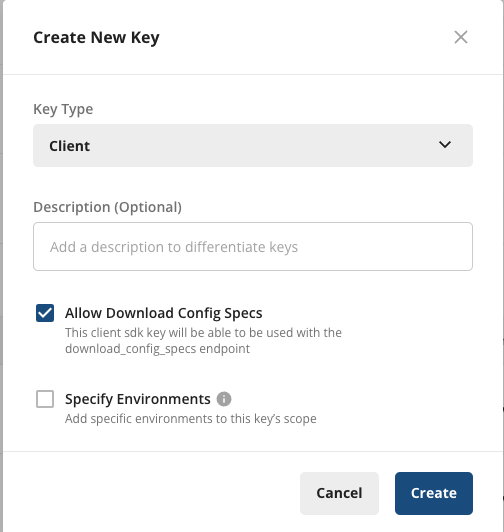 To add the scope to an existing key, under **Project Settings** > **API Keys** > **Client API Keys**, select **Actions** > **Edit Scopes**, and select **"Allow Download Config Specs"**, then **Save**.
 ```swift Async (Swift) theme={null}
import StatsigOnDeviceEvaluations
// (optional) Configure the SDK if needed
let opts = StatsigOptions()
opts.environment.tier = "staging"
Statsig.shared.initialize("client-sdk-key", options: opts) { err in
if let err = err {
print("Error \(err)")
}
}
// or, create your own instance
let myStatsigInstance = Statsig()
myStatsigInstance.initialize("client-sdk-key", options: opts) { err in
if let err = err {
print("Error \(err)")
}
}
```
```objective-c Objective C theme={null}
StatsigOptions *options = [StatsigOptions new];
StatsigEnvironment *env = [StatsigEnvironment new];
env.tier = @"staging";
options.environment = env;
[[Statsig sharedInstance]
initializeWithSDKKey:@"client-sdk-key"
options:options
completion:^(NSError * _Nullable error) {
if (error != nil) {
NSLog(@"Error %@", error);
}
}];
```
```swift Synchronous (Swift) theme={null}
import StatsigOnDeviceEvaluations
// (optional) Configure the SDK if needed
let opts = StatsigOptions()
opts.environment.tier = "staging"
let specs: NSString = "..." // JSON string of your configurations
let error = client.initializeSync("client-sdk-key", initialSpecs: specs)
if let err = error {
print("Error \(err)")
}
```
It is possible to configure the SDK to use cached values if they are newer than the local file.
This can be useful if you ship your app with a local file, but would like it to only be used for the first session.
In the following example, the SDK will only use initialSpecs if there is no cache or if the cache is older than initialSpecs.
```swift theme={null}
let options = StatsigOptions()
options.useNewerCacheValuesOverProvidedValues = true
client.initializeSync(
"client-sdk-key",
initialSpecs: specs,
options: options
)
```
You can get a copy of your current specs data by visiting: `https://api.statsigcdn.com/v1/download_config_specs/client-{YOUR_SDK_KEY}.json`
## Working with the SDK
### Checking a Feature Flag/Gate
Now that your SDK is initialized, let's check a [**Feature Gate**](/feature-flags/overview). Feature Gates can be used to create logic branches in code that can be rolled out to different users from the Statsig Console. Gates are always **CLOSED** or **OFF** (think `return false;`) by default.
```swift Swift theme={null}
// Simple Pass/Fail check
let isPassing: Bool = Statsig.shared.checkGate("my_gate", user)
// or, the verbose FeatureGate check
let gate = Statsig.shared.getFeatureGate("my_gate", user)
print(gate.evaluationDetails.reason) // "Network" | "Cache" | "Unrecognized"
let isPassing: Bool = gate.value
```
```objective-c Objective C theme={null}
BOOL isPassing = [[Statsig sharedInstance] checkGate:@"my_gate" forUser:user];
```
### Reading a Dynamic Config
Feature Gates can be very useful for simple on/off switches, with optional but advanced user targeting. However, if you want to be able send a different set of values (strings, numbers, and etc.) to your clients based on specific user attributes, e.g. country, **Dynamic Configs** can help you with that. The API is very similar to Feature Gates, but you get an entire json object you can configure on the server and you can fetch typed parameters from it. For example:
```swift theme={null}
let config = Statsig.shared.getDynamicConfig("my_dynamic_config", user)
let name: String? = config.value["product_name"] as? String
let price: Double? = config.value["price"] as? Double
```
### Getting a Layer/Experiment
Then we have **Layers/Experiments**, which you can use to run A/B/n experiments. We offer two APIs, but we recommend the use of [layers](/layers) to enable quicker iterations with parameter reuse.
```swift theme={null}
// Getting values via getLayer
let layer = Statsig.shared.getLayer("my_layer", user)
let name: String? = layer.getValue(param: "product_name", fallback: "Unknown") as? String
// or, using getExperiment
let experiment = Statsig.shared.getExperiment("my_experiment", user)
let name: String? = experiment.value["product_name"] as? String
let price: Double? = experiment.value["price"] as? Double
```
### Logging an Event
Now that you have a Feature Gate or an Experiment set up, you may want to track some custom events and see how your new features or different experiment groups affect these events. This is super easy with Statsig - simply call the Log Event API for the event, and you can additionally provide some value and/or an object of metadata to be logged together with the event:
```swift theme={null}
let event = StatsigEvent(
eventName: "add_to_cart",
value: "SKU_1234",
metadata: [
"price": "9.99",
"item_name": "CoolProduct"
]
)
Statsig.shared.logEvent(event, user)
```
### Code Examples
Working sample apps are available in the repository:
* [Swift & Objective C Examples](https://github.com/statsig-io/swift-on-device-evaluations-sdk/tree/main/Sample/App/Examples/OnDeviceEvaluations)
Included are both Swift and Objective C uses.
## Statsig User
You need to provide a StatsigUser object to check/get your configurations. You should pass as much
information as possible in order to take advantage of advanced gate and config conditions.
Most of the time, the `userID` field is needed in order to provide a consistent experience for a given
user (see [logged-out experiments](/guides/first-device-level-experiment) to understand how to correctly run experiments for logged-out
users).
Besides `userID`, we also have `email`, `ip`, `userAgent`, `country`, `locale` and `appVersion` as top-level fields on
StatsigUser. In addition, you can pass any key-value pairs in an object/dictionary to the `custom` field and be able to
create targeting based on them.
Once the user logs in or has an update/changed, make sure to call `updateUser`
with the updated `userID` and/or any other updated user attributes:
```swift Swift theme={null}
let user = StatsigUser(
userID: "a-user",
customIDs: ["EmployeeID": "an-employee"],
email: "user@statsig.io",
ip: "58.84.239.246",
userAgent: "Mozilla/5.0 (iPad; CPU OS 13_4_1....",
country: "NZ",
locale: "en_NZ",
appVersion: "3.2.1",
custom: ["Level": "9001"],
privateAttributes: ["SensitiveInfo": "shhh"]
)
```
```objective-c Objective C theme={null}
StatsigUser *user = [StatsigUser userWithUserID:@"a-user"];
user.customIDs = @{ @"EmployeeID": @"an-employee" };
user.email = @"user@statsig.io";
user.ip = @"58.84.239.246";
user.userAgent = @"Mozilla/5.0 (iPad; CPU OS 13_4_1....";
user.country = @"NZ";
user.locale = @"en_NZ";
user.appVersion = @"3.2.1";
[user.custom setString:@"9001" forKey:@"Level"];
[user.privateAttributes setString:@"shhh" forKey:@"SensitiveInfo"];
```
### Private Attributes
Have sensitive user PII data that should not be logged? No problem, we have a solution for it! On the StatsigUser object we also have a field called `privateAttributes`, which is a simple object/dictionary that you can use to set private user attributes. Any attribute set in `privateAttributes` will only be used for evaluation/targeting, and removed from any logs before they are sent to Statsig server.
For example, if you have feature gates that should only pass for users with emails ending in "@statsig.com", but do not want to log your users' email addresses to Statsig, you can simply add the key-value pair `{ email: "my_user@statsig.com" }` to `privateAttributes` on the user and that's it!
### Setting a Global User
To avoid needing to pass the user object to every single evaluation call, you can set a global user.
This user will be used for all evaluations unless otherwise specified.
```swift theme={null}
Statsig.shared.setGlobalUser(myGlobalUser)
Statsig.shared.checkGate("my_gate") // <- Will use myGlobalUser
Statsig.shared.checkGate("my_gate", StatsigUser(userID: "user-123")) // <- Will NOT use myGlobalUser
```
## Statsig Options
You can configure certain aspects of the SDKs behavior by passing a StatsigOptions object during initialization.
The maximum number of events to batch before flushing logs to the server.
How frequently to flush queued logs.
The API where all events are sent.
The API used to fetch the latest configurations.
An object you can use to set environment variables that apply to all of your users in the same session and will be used for targeting purposes.
## Lifecycle & Advanced Usage
## Shutting Statsig Down
In order to save users' data and battery usage, as well as prevent logged events from being dropped, we keep event logs in client cache and flush periodically.
Because of this, some events may not have been sent when your app shuts down.
To make sure all logged events are properly flushed or saved locally, you should tell Statsig to shutdown when your app is closing:
```swift Swift theme={null}
Statsig.shared.shutdown { err in
if let err = err {
print("An error occurred during Statsig shutdown: \(err)")
} else {
print("Statsig shutdown successfully")
}
}
```
```objective-c Objective C theme={null}
[[Statsig sharedInstance] shutdownWithCompletion:^(NSError * _Nullable error) {
if (error != nil) {
NSLog(@"An error occurred during Statsig shutdown: %@", error);
} else {
NSLog(@"Statsig shutdown successfully");
}
}];
```
## Post Init Syncing
### From Network
By default, the SDK will only sync during initialization. If you would like to re-sync after initialization, you can call the `Statsig.update` method.
This will trigger a network call to fetch the latest changes from the server.
```swift theme={null}
Statsig.shared.update { err in
if let err = err {
print("Statsig update error: \(err)")
}
}
```
### From a Local File
If you maintain your own copy of the "specs" json, you can pass it in to the update with `Statsig.updateSync()`. This will skip the network call and use the provided specs instead.
```swift theme={null}
let result = Statsig.shared.updateSync(updatedSpecs: myJsonData)
```
### Scheduled Polling
If you would like the SDK to regularly poll for updates, you can start the polling task with `Statsig.scheduleBackgroundUpdates()`.
This will call `Statsig.update` internally, hitting the network and pulling down the latest changes.
```swift theme={null}
let pollingTask = Statsig.shared.scheduleBackgroundUpdates() // Defaults to 1 hour interval
// or, specify a custom interval
let pollingTask = Statsig.shared.scheduleBackgroundUpdates(intervalSeconds: 300)
// and, if you need to cancel it later
pollingTask?.cancel()
```
## Local Overrides
It is possible to override the values returned by the Statsig SDK. This can be useful in unit testing or for enabling features for local development.
To get setup with local overrides, you can pass an instance of `LocalOverrideAdapter` to the SDK via the `StatsigOptions` object.
It is possible to write your own override adapter. You can implement the [`OverrideAdapter`](https://github.com/statsig-io/swift-on-device-evaluations-sdk/blob/main/Sources/StatsigOnDeviceEvaluations/OverrideAdapter.swift) protocol and pass that in instead.
```swift Swift theme={null}
let user = StatsigUser(userID: "a-user")
let overrides = LocalOverrideAdapter()
// Override a gate
overrides.setGate(user, FeatureGate.create("local_override_gate", true))
// Override a dynamic config (Similar for Layer and Experiment)
overrides.setDynamicConfig(user, DynamicConfig.create("local_override_dynamic_config", ["foo": "bar"]))
let opts = StatsigOptions()
opts.overrideAdapter = overrides
Statsig.shared.initialize(YOUR_SDK_KEY, options: opts) { _ in
let gate = Statsig.shared.getFeatureGate("local_override_gate", user)
print("Result: \(gate.value) (\(gate.evaluationDetails.reason))")
}
```
```objective-c Objective C theme={null}
StatsigUser *user = [StatsigUser userWithUserID:@"a-user"];
LocalOverrideAdapter *overrides = [LocalOverrideAdapter new];
// Override a gate
[overrides
setGateForUser:user
gate:[FeatureGate createWithName:@"local_override_gate" andValue:true]];
// Override a dynamic config (Similar for Layer and Experiment)
[_overrides
setDynamicConfigForUser:user
config:[DynamicConfig
createWithName:@"local_override_dynamic_config"
andValue:@{@"foo": @"bar"}]];
StatsigOptions *options = [StatsigOptions new];
options.overrideAdapter = overrides;
[[Statsig sharedInstance]
initializeWithSDKKey:YOUR_SDK_KEY
options:options
completion:^(NSError * _Nullable error) {
FeatureGate *gate = [[Statsig sharedInstance] getFeatureGate:@"local_override_gate" forUser:user options:nil];
NSLog(@"Result: %d (%@)", gate.value, gate.evaluationDetails.reason);
}];
```
## FAQs
See the guide on [device level experiments](/guides/first-device-level-experiment).
## Additional Resources
* [On-Device Evaluation SDK Overview](/client/onDevice)
* [Client Keys with Server Permissions](/sdk-keys/api-keys/#client-keys-with-server-permissions)
* [Debugging SDK Evaluations](/sdk/debugging)
```swift Async (Swift) theme={null}
import StatsigOnDeviceEvaluations
// (optional) Configure the SDK if needed
let opts = StatsigOptions()
opts.environment.tier = "staging"
Statsig.shared.initialize("client-sdk-key", options: opts) { err in
if let err = err {
print("Error \(err)")
}
}
// or, create your own instance
let myStatsigInstance = Statsig()
myStatsigInstance.initialize("client-sdk-key", options: opts) { err in
if let err = err {
print("Error \(err)")
}
}
```
```objective-c Objective C theme={null}
StatsigOptions *options = [StatsigOptions new];
StatsigEnvironment *env = [StatsigEnvironment new];
env.tier = @"staging";
options.environment = env;
[[Statsig sharedInstance]
initializeWithSDKKey:@"client-sdk-key"
options:options
completion:^(NSError * _Nullable error) {
if (error != nil) {
NSLog(@"Error %@", error);
}
}];
```
```swift Synchronous (Swift) theme={null}
import StatsigOnDeviceEvaluations
// (optional) Configure the SDK if needed
let opts = StatsigOptions()
opts.environment.tier = "staging"
let specs: NSString = "..." // JSON string of your configurations
let error = client.initializeSync("client-sdk-key", initialSpecs: specs)
if let err = error {
print("Error \(err)")
}
```
It is possible to configure the SDK to use cached values if they are newer than the local file.
This can be useful if you ship your app with a local file, but would like it to only be used for the first session.
In the following example, the SDK will only use initialSpecs if there is no cache or if the cache is older than initialSpecs.
```swift theme={null}
let options = StatsigOptions()
options.useNewerCacheValuesOverProvidedValues = true
client.initializeSync(
"client-sdk-key",
initialSpecs: specs,
options: options
)
```
You can get a copy of your current specs data by visiting: `https://api.statsigcdn.com/v1/download_config_specs/client-{YOUR_SDK_KEY}.json`
## Working with the SDK
### Checking a Feature Flag/Gate
Now that your SDK is initialized, let's check a [**Feature Gate**](/feature-flags/overview). Feature Gates can be used to create logic branches in code that can be rolled out to different users from the Statsig Console. Gates are always **CLOSED** or **OFF** (think `return false;`) by default.
```swift Swift theme={null}
// Simple Pass/Fail check
let isPassing: Bool = Statsig.shared.checkGate("my_gate", user)
// or, the verbose FeatureGate check
let gate = Statsig.shared.getFeatureGate("my_gate", user)
print(gate.evaluationDetails.reason) // "Network" | "Cache" | "Unrecognized"
let isPassing: Bool = gate.value
```
```objective-c Objective C theme={null}
BOOL isPassing = [[Statsig sharedInstance] checkGate:@"my_gate" forUser:user];
```
### Reading a Dynamic Config
Feature Gates can be very useful for simple on/off switches, with optional but advanced user targeting. However, if you want to be able send a different set of values (strings, numbers, and etc.) to your clients based on specific user attributes, e.g. country, **Dynamic Configs** can help you with that. The API is very similar to Feature Gates, but you get an entire json object you can configure on the server and you can fetch typed parameters from it. For example:
```swift theme={null}
let config = Statsig.shared.getDynamicConfig("my_dynamic_config", user)
let name: String? = config.value["product_name"] as? String
let price: Double? = config.value["price"] as? Double
```
### Getting a Layer/Experiment
Then we have **Layers/Experiments**, which you can use to run A/B/n experiments. We offer two APIs, but we recommend the use of [layers](/layers) to enable quicker iterations with parameter reuse.
```swift theme={null}
// Getting values via getLayer
let layer = Statsig.shared.getLayer("my_layer", user)
let name: String? = layer.getValue(param: "product_name", fallback: "Unknown") as? String
// or, using getExperiment
let experiment = Statsig.shared.getExperiment("my_experiment", user)
let name: String? = experiment.value["product_name"] as? String
let price: Double? = experiment.value["price"] as? Double
```
### Logging an Event
Now that you have a Feature Gate or an Experiment set up, you may want to track some custom events and see how your new features or different experiment groups affect these events. This is super easy with Statsig - simply call the Log Event API for the event, and you can additionally provide some value and/or an object of metadata to be logged together with the event:
```swift theme={null}
let event = StatsigEvent(
eventName: "add_to_cart",
value: "SKU_1234",
metadata: [
"price": "9.99",
"item_name": "CoolProduct"
]
)
Statsig.shared.logEvent(event, user)
```
### Code Examples
Working sample apps are available in the repository:
* [Swift & Objective C Examples](https://github.com/statsig-io/swift-on-device-evaluations-sdk/tree/main/Sample/App/Examples/OnDeviceEvaluations)
Included are both Swift and Objective C uses.
## Statsig User
You need to provide a StatsigUser object to check/get your configurations. You should pass as much
information as possible in order to take advantage of advanced gate and config conditions.
Most of the time, the `userID` field is needed in order to provide a consistent experience for a given
user (see [logged-out experiments](/guides/first-device-level-experiment) to understand how to correctly run experiments for logged-out
users).
Besides `userID`, we also have `email`, `ip`, `userAgent`, `country`, `locale` and `appVersion` as top-level fields on
StatsigUser. In addition, you can pass any key-value pairs in an object/dictionary to the `custom` field and be able to
create targeting based on them.
Once the user logs in or has an update/changed, make sure to call `updateUser`
with the updated `userID` and/or any other updated user attributes:
```swift Swift theme={null}
let user = StatsigUser(
userID: "a-user",
customIDs: ["EmployeeID": "an-employee"],
email: "user@statsig.io",
ip: "58.84.239.246",
userAgent: "Mozilla/5.0 (iPad; CPU OS 13_4_1....",
country: "NZ",
locale: "en_NZ",
appVersion: "3.2.1",
custom: ["Level": "9001"],
privateAttributes: ["SensitiveInfo": "shhh"]
)
```
```objective-c Objective C theme={null}
StatsigUser *user = [StatsigUser userWithUserID:@"a-user"];
user.customIDs = @{ @"EmployeeID": @"an-employee" };
user.email = @"user@statsig.io";
user.ip = @"58.84.239.246";
user.userAgent = @"Mozilla/5.0 (iPad; CPU OS 13_4_1....";
user.country = @"NZ";
user.locale = @"en_NZ";
user.appVersion = @"3.2.1";
[user.custom setString:@"9001" forKey:@"Level"];
[user.privateAttributes setString:@"shhh" forKey:@"SensitiveInfo"];
```
### Private Attributes
Have sensitive user PII data that should not be logged? No problem, we have a solution for it! On the StatsigUser object we also have a field called `privateAttributes`, which is a simple object/dictionary that you can use to set private user attributes. Any attribute set in `privateAttributes` will only be used for evaluation/targeting, and removed from any logs before they are sent to Statsig server.
For example, if you have feature gates that should only pass for users with emails ending in "@statsig.com", but do not want to log your users' email addresses to Statsig, you can simply add the key-value pair `{ email: "my_user@statsig.com" }` to `privateAttributes` on the user and that's it!
### Setting a Global User
To avoid needing to pass the user object to every single evaluation call, you can set a global user.
This user will be used for all evaluations unless otherwise specified.
```swift theme={null}
Statsig.shared.setGlobalUser(myGlobalUser)
Statsig.shared.checkGate("my_gate") // <- Will use myGlobalUser
Statsig.shared.checkGate("my_gate", StatsigUser(userID: "user-123")) // <- Will NOT use myGlobalUser
```
## Statsig Options
You can configure certain aspects of the SDKs behavior by passing a StatsigOptions object during initialization.
The maximum number of events to batch before flushing logs to the server.
How frequently to flush queued logs.
The API where all events are sent.
The API used to fetch the latest configurations.
An object you can use to set environment variables that apply to all of your users in the same session and will be used for targeting purposes.
## Lifecycle & Advanced Usage
## Shutting Statsig Down
In order to save users' data and battery usage, as well as prevent logged events from being dropped, we keep event logs in client cache and flush periodically.
Because of this, some events may not have been sent when your app shuts down.
To make sure all logged events are properly flushed or saved locally, you should tell Statsig to shutdown when your app is closing:
```swift Swift theme={null}
Statsig.shared.shutdown { err in
if let err = err {
print("An error occurred during Statsig shutdown: \(err)")
} else {
print("Statsig shutdown successfully")
}
}
```
```objective-c Objective C theme={null}
[[Statsig sharedInstance] shutdownWithCompletion:^(NSError * _Nullable error) {
if (error != nil) {
NSLog(@"An error occurred during Statsig shutdown: %@", error);
} else {
NSLog(@"Statsig shutdown successfully");
}
}];
```
## Post Init Syncing
### From Network
By default, the SDK will only sync during initialization. If you would like to re-sync after initialization, you can call the `Statsig.update` method.
This will trigger a network call to fetch the latest changes from the server.
```swift theme={null}
Statsig.shared.update { err in
if let err = err {
print("Statsig update error: \(err)")
}
}
```
### From a Local File
If you maintain your own copy of the "specs" json, you can pass it in to the update with `Statsig.updateSync()`. This will skip the network call and use the provided specs instead.
```swift theme={null}
let result = Statsig.shared.updateSync(updatedSpecs: myJsonData)
```
### Scheduled Polling
If you would like the SDK to regularly poll for updates, you can start the polling task with `Statsig.scheduleBackgroundUpdates()`.
This will call `Statsig.update` internally, hitting the network and pulling down the latest changes.
```swift theme={null}
let pollingTask = Statsig.shared.scheduleBackgroundUpdates() // Defaults to 1 hour interval
// or, specify a custom interval
let pollingTask = Statsig.shared.scheduleBackgroundUpdates(intervalSeconds: 300)
// and, if you need to cancel it later
pollingTask?.cancel()
```
## Local Overrides
It is possible to override the values returned by the Statsig SDK. This can be useful in unit testing or for enabling features for local development.
To get setup with local overrides, you can pass an instance of `LocalOverrideAdapter` to the SDK via the `StatsigOptions` object.
It is possible to write your own override adapter. You can implement the [`OverrideAdapter`](https://github.com/statsig-io/swift-on-device-evaluations-sdk/blob/main/Sources/StatsigOnDeviceEvaluations/OverrideAdapter.swift) protocol and pass that in instead.
```swift Swift theme={null}
let user = StatsigUser(userID: "a-user")
let overrides = LocalOverrideAdapter()
// Override a gate
overrides.setGate(user, FeatureGate.create("local_override_gate", true))
// Override a dynamic config (Similar for Layer and Experiment)
overrides.setDynamicConfig(user, DynamicConfig.create("local_override_dynamic_config", ["foo": "bar"]))
let opts = StatsigOptions()
opts.overrideAdapter = overrides
Statsig.shared.initialize(YOUR_SDK_KEY, options: opts) { _ in
let gate = Statsig.shared.getFeatureGate("local_override_gate", user)
print("Result: \(gate.value) (\(gate.evaluationDetails.reason))")
}
```
```objective-c Objective C theme={null}
StatsigUser *user = [StatsigUser userWithUserID:@"a-user"];
LocalOverrideAdapter *overrides = [LocalOverrideAdapter new];
// Override a gate
[overrides
setGateForUser:user
gate:[FeatureGate createWithName:@"local_override_gate" andValue:true]];
// Override a dynamic config (Similar for Layer and Experiment)
[_overrides
setDynamicConfigForUser:user
config:[DynamicConfig
createWithName:@"local_override_dynamic_config"
andValue:@{@"foo": @"bar"}]];
StatsigOptions *options = [StatsigOptions new];
options.overrideAdapter = overrides;
[[Statsig sharedInstance]
initializeWithSDKKey:YOUR_SDK_KEY
options:options
completion:^(NSError * _Nullable error) {
FeatureGate *gate = [[Statsig sharedInstance] getFeatureGate:@"local_override_gate" forUser:user options:nil];
NSLog(@"Result: %d (%@)", gate.value, gate.evaluationDetails.reason);
}];
```
## FAQs
See the guide on [device level experiments](/guides/first-device-level-experiment).
## Additional Resources
* [On-Device Evaluation SDK Overview](/client/onDevice)
* [Client Keys with Server Permissions](/sdk-keys/api-keys/#client-keys-with-server-permissions)
* [Debugging SDK Evaluations](/sdk/debugging)