> ## Documentation Index
> Fetch the complete documentation index at: https://statsig-4b2ff144-serverless-cloudflare.mintlify.site/llms.txt
> Use this file to discover all available pages before exploring further.
# Manage a Safeguard
> Learn how to view and manage safeguards for your feature flags
## View a Safeguard
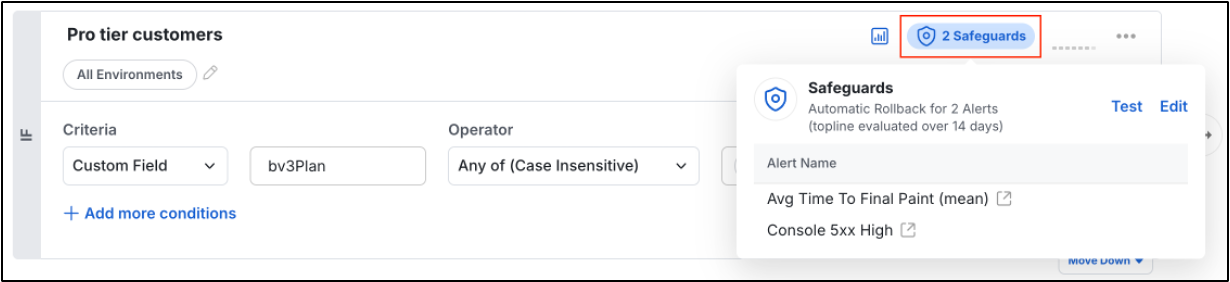
To view an existing Safeguard, tap the blue pill on your Feature Gate's targeting rule. Here you can see how your Safeguard is currently defined and make any changes if you want. You can add/remove alerts, change the action, or adjust the evaluation period.
 ## When a Safeguard triggers
When a safeguard is triggered because of an alert:
* The configured action executes automatically (rollback/pause/complete)
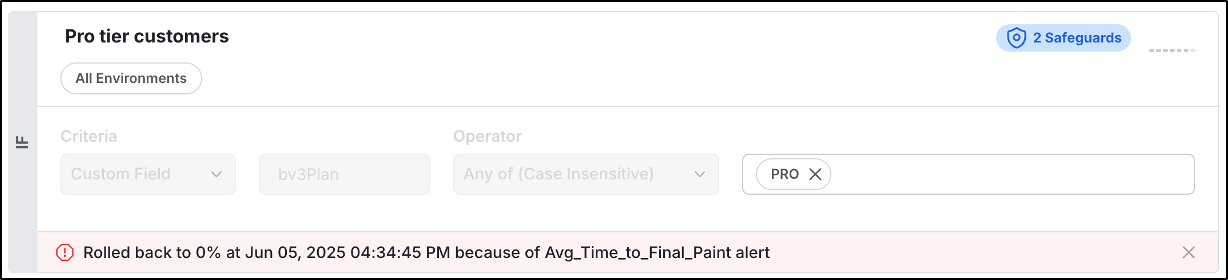
* A banner appears on the targeting rule with action taken, timestamp, and diagnostic link
* Further rule modifications are blocked until the alert is resolved
* Notifications are sent per your alert configuration
## When a Safeguard triggers
When a safeguard is triggered because of an alert:
* The configured action executes automatically (rollback/pause/complete)
* A banner appears on the targeting rule with action taken, timestamp, and diagnostic link
* Further rule modifications are blocked until the alert is resolved
* Notifications are sent per your alert configuration