> ## Documentation Index
> Fetch the complete documentation index at: https://statsig-4b2ff144-serverless-cloudflare.mintlify.site/llms.txt
> Use this file to discover all available pages before exploring further.
# Testing your Gates/Experiments
Statsig enhances your engineering velocity by offering tools and features that allow you to test configurations quickly while ensuring reliable outcomes. This page highlights key features across the product to help you test efficiently.
***
## Overrides: Test Features, Experiments, or Holdouts
Overrides allow you to manually configure [features](/feature-flags/overrides#adding-an-override), [experiments](/experiments-plus/overrides), or [holdouts](/holdouts) for testing purposes. This method enables safe testing without affecting live production data or skewing experiment results. **Overrides are excluded from Pulse analysis** to maintain unbiased results.
* Use **Segments** to target overrides to pre-production environments or specific groups (e.g., employees) for testing.
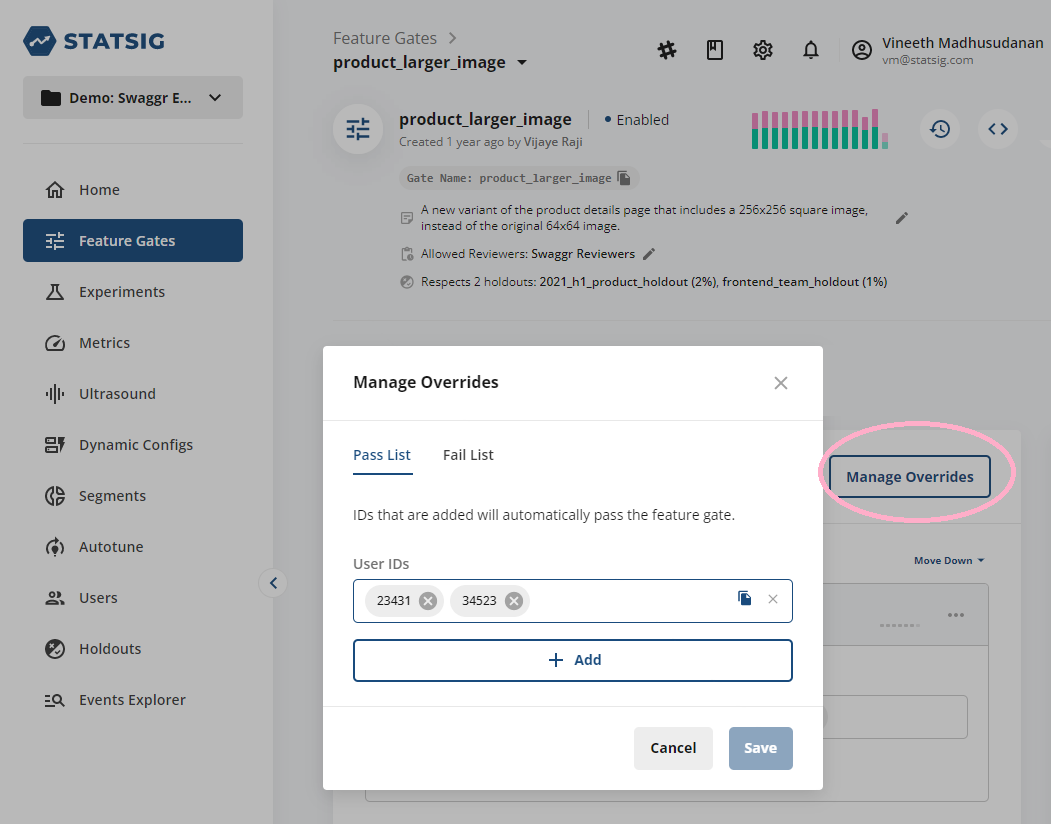
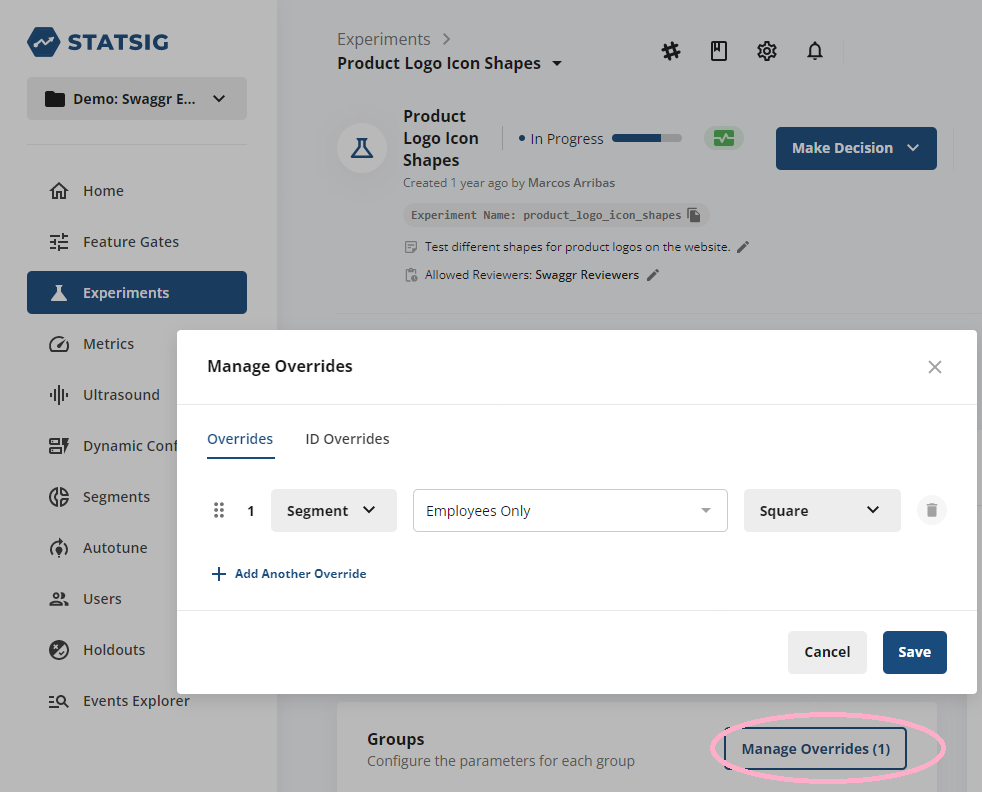 For more details on adding overrides, see:
* [Feature Overrides](/feature-flags/overrides#adding-an-override)
* [Experiment Overrides](/experiments-plus/overrides)
* [Holdout Overrides](/holdouts)
***
## Unit Testing with Statsig
Statsig's **Server SDKs** offer a `localMode` feature that disables network access, ensuring that tests run locally and independently of production systems. When `localMode` is active, the SDK returns default values, allowing you to mock features and experiments in a controlled test environment.
### Override APIs for Testing
You can use the `overrideGate` and `overrideConfig` APIs to set specific overrides for users or globally during testing.
```js theme={null}
function overrideGate(
gateName: string,
value: boolean,
userID?: string,
): void;
```
```js theme={null}
function overrideConfig(
configName: string,
value: object,
userID?: string,
): void;
```
For example, to override a gate for testing:
```js theme={null}
statsig.overrideGate("example_gate", true);
```
* For more information on how to mock Statsig for testing, refer to [Node.js Server SDK](/server/nodejsServerSDK#how-can-i-mock-statsig-for-testing) or [JavaScript Client SDK](/client/javascript-sdk#testing).
***
## Environments: Configuring Development, Staging, and Production
Statsig enables you to assign environments to feature gates, experiments, and events. By default, checks without a defined environment are assigned to **Production**. You can customize environments (such as **Development**, **Staging**, or **Production**) and use them to target different versions of feature gates or segments.
* Non-production events appear in diagnostics but are excluded from Pulse results to ensure production data is prioritized in final analyses.
### Customizing Environments
You can map your internal environments to Statsig's built-in environments or create custom mappings. Common setups include:
* Assigning Dev One boxes to **Development**.
* Creating an **Early Access** slice (e.g., 1% of production users) as part of the **Production** environment for phased rollouts.
For more details on environments, refer to this [Statsig blog post](https://blog.statsig.com/environments-on-statsig-6a818805b3c2).
***
For more details on adding overrides, see:
* [Feature Overrides](/feature-flags/overrides#adding-an-override)
* [Experiment Overrides](/experiments-plus/overrides)
* [Holdout Overrides](/holdouts)
***
## Unit Testing with Statsig
Statsig's **Server SDKs** offer a `localMode` feature that disables network access, ensuring that tests run locally and independently of production systems. When `localMode` is active, the SDK returns default values, allowing you to mock features and experiments in a controlled test environment.
### Override APIs for Testing
You can use the `overrideGate` and `overrideConfig` APIs to set specific overrides for users or globally during testing.
```js theme={null}
function overrideGate(
gateName: string,
value: boolean,
userID?: string,
): void;
```
```js theme={null}
function overrideConfig(
configName: string,
value: object,
userID?: string,
): void;
```
For example, to override a gate for testing:
```js theme={null}
statsig.overrideGate("example_gate", true);
```
* For more information on how to mock Statsig for testing, refer to [Node.js Server SDK](/server/nodejsServerSDK#how-can-i-mock-statsig-for-testing) or [JavaScript Client SDK](/client/javascript-sdk#testing).
***
## Environments: Configuring Development, Staging, and Production
Statsig enables you to assign environments to feature gates, experiments, and events. By default, checks without a defined environment are assigned to **Production**. You can customize environments (such as **Development**, **Staging**, or **Production**) and use them to target different versions of feature gates or segments.
* Non-production events appear in diagnostics but are excluded from Pulse results to ensure production data is prioritized in final analyses.
### Customizing Environments
You can map your internal environments to Statsig's built-in environments or create custom mappings. Common setups include:
* Assigning Dev One boxes to **Development**.
* Creating an **Early Access** slice (e.g., 1% of production users) as part of the **Production** environment for phased rollouts.
For more details on environments, refer to this [Statsig blog post](https://blog.statsig.com/environments-on-statsig-6a818805b3c2).
***