> ## Documentation Index
> Fetch the complete documentation index at: https://statsig-4b2ff144-serverless-cloudflare.mintlify.site/llms.txt
> Use this file to discover all available pages before exploring further.
# Heap
## Overview
Enabling the Heap integration allows you to export Statsig events to your configured Heap app with information on the status of each user's feature gate and experimentation groups.
Statsig will send events to Heap when a client SDK is initialized and will also forward events as they are received.
## Client SDK Initialize Events
Statsig sends the following events to your Heap app every time you call the `initialize` API from a Statsig client SDK.
| Event Name | Properties |
| --------------------- | ------------------------------------------------------------------------------------------------------------------------------------------------------------------------------------------------------------------------ |
| Statsig Feature Gates | For each [Statsig Feature Gate](/feature-flags/overview), this field contains a property that maps the name of the feature gate to `true` or `false`, stating whether the user passes or does not pass the feature gate. |
| Statsig Experiments | For each [Statsig Experiment](/experiments-plus), this field contains a property that maps the name of the experiment to the variant that the user is assigned to. |
## Exposures and Custom Event Forwarding
Statsig can forward events as they are received from SDKs, Integrations or the HTTP API.
Events include exposures (Gate, Experiment, Config) and custom events.
### Event Format
Events will be sent in batches in a JSON format. The structure of a Statsig Event sent will look like the following:
| Field | Type | Description |
| --------------- | ------ | ---------------------------------------------------------------- |
| eventName | String | Name of the event provided |
| user | JSON | [Statsig User Object](https://docs.statsig.com/concepts/user) |
| userID | String | User ID provided |
| timestamp | Number | Timestamp in MS of the event |
| value | String | Value of the event provided |
| metadata | JSON | Custom Metadata provided |
| statsigMetadata | JSON | Metadata related to the logging of this event added by Statsig |
| timeUUID | String | UUID for the event |
| unitID | String | Unit ID of the exposure (e.g. userID, stableID, or the customID) |
#### Custom Event Formatting - logEvent
>
```json theme={null}
{
"eventName": "my_custom_event",
"user": {
"userID": "a_user",
"email": "a.user@email.com"
},
"userID": "a_user",
"timestamp": "1655231253265",
"statsigMetadata": {
...
},
"value": "a_custom_value",
"metadata": {
"key_a": "value_a",
"key_b": "123"
},
"timeUUID": "abd2a983-ec0f-11ec-917a-fb8cdaeda578"
}
```
#### Feature Gate Exposure Formatting - checkGate
>
```json theme={null}
{
"eventName": "statsig::gate_exposure",
"user": { ... },
"userID": "a_user",
"timestamp": "1655231253265",
"statsigMetadata": { ... },
"value": "",
"metadata": {
"gate": "a_gate",
"gateValue": "false",
"ruleID": "default",
"reason": "Network",
"time": "1655231249644"
},
"timeUUID": "8d7c1040-ec11-11ec-g123-abe2c32fcf46",
"unitID": "userID"
}
```
#### Dynamic Config Exposure Formatting - getConfig
>
```json theme={null}
{
"eventName": "statsig::config_exposure",
"user": { ... },
"userID": "a_user",
"timestamp": "1655231253265",
"statsigMetadata": { ... },
"value": "",
"metadata": {
"config": "a_config",
"ruleID": "default",
"reason": "Network",
"time": "1655231249644"
},
"timeUUID": "af379f60-ec11-22ad-8e0a-05c3ee70bd0c",
"unitID": "userID"
}
```
#### Experiment Exposure Formatting - getExperiment
>
```json theme={null}
{
"eventName": "statsig::experiment_exposure",
"user": { ... },
"userID": "a_user",
"timestamp": "1655232119734",
"statsigMetadata": { ... },
"value": "",
"metadata": {
"config": "an_experiment",
"ruleID": "4SauZJcM1T7zNvh1igBjwE",
"reason": "Network",
"time": "1655231249644",
"experimentGroupName": "Control"
},
"timeUUID": "af379f61-ab22-11ec-8e0a-05c3ee70bd0c",
"unitID": "userID"
}
```
#### Example Batch
>
```json theme={null}
[
{
"eventName": "page_view",
"user": {"userID": "user_1", "country": "US"},
"userID": "user_1",
"timestamp": 1644520566967,
"value": "example_value",
"metadata": {"page": "home_page"},
"statsigMetadata": {},
"timeUUID": "f4c414a0-8ab5-11ec-a8a3-0242ac120002"
},
{
"eventName": "statsig::gate_exposure",
"user": {"userID": "user_1", "country": "US"},
"userID": "user_1",
"timestamp": 1644520566968,
"value": "",
"metadata": {"gate": "test_gate", "gateValue": "true", "ruleID": "default"},
"statsigMetadata": {},
"timeUUID": "f4c414a0-8ab5-11ec-a8a3-0242ac120003",
"unitID": "userID"
},
{
"eventName": "statsig::experiment_exposure"
"user": {"userID": "user_1", "country": "US"},
"userID": "user_1",
"timestamp": 1644520566969,
"value": "",
"metadata": {
"config": "an_experiment", "ruleID": "4SauZJcM1T7zNvh1igBjwE", "reason": "Network", "time": "1655231249644", "experimentGroupName": "Control"
},
"statsigMetadata": {},
"timeUUID": "f4c414a0-8ab5-11ec-a8a3-0242ac120004",
"unitID": "userID"
}
]
```
## Configuring Outbound Events
1. Navigate to your [Heap Projects](https://heapanalytics.com/app/manage/projects) page to find and copy the App ID for your project.
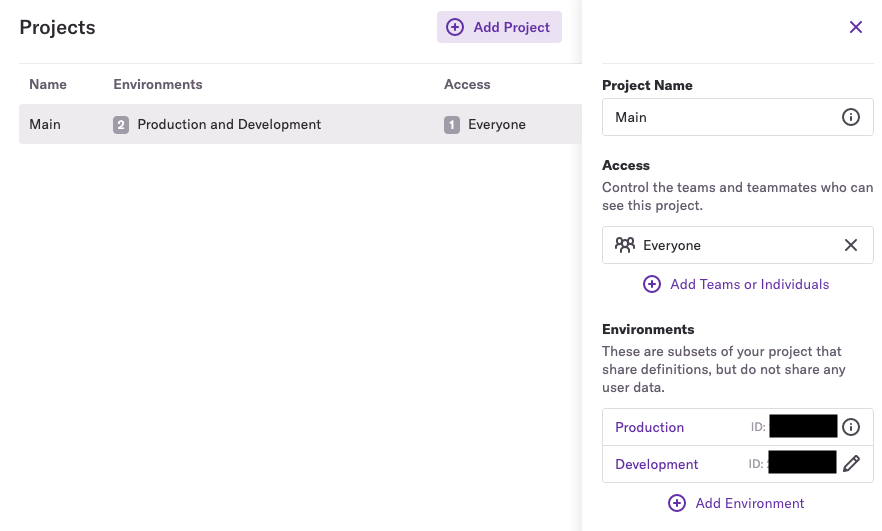 2. Paste the App ID into the App ID input field for the Heap configuration in the Statsig [Integrations](https://console.statsig.com/integrations) page and save your changes.