> ## Documentation Index
> Fetch the complete documentation index at: https://statsig-4b2ff144-serverless-cloudflare.mintlify.site/llms.txt
> Use this file to discover all available pages before exploring further.
# Qualifying Events
## Using Qualifying Events
Qualifying events are used to simulate exposures for power analysis, and to filter exposures to users who triggered a specific event. Setting up a Qualifying Event is identical to setting up an Assignment Source, except they do not require experimental information.
Please note that the qualifying event must occur after the exposure as indicated by their respective timestamps.
Context columns can be used to filter the qualifying event for power analysis - for example you might have a Qualifying Event for page load, and filter to different page identifiers for power analyses of experiments on different surfaces.
## Filter by Qualifying Events
Statsig has best-in-class controls around using qualifying events to filter exposures in an experiment in cases of over-exposure.
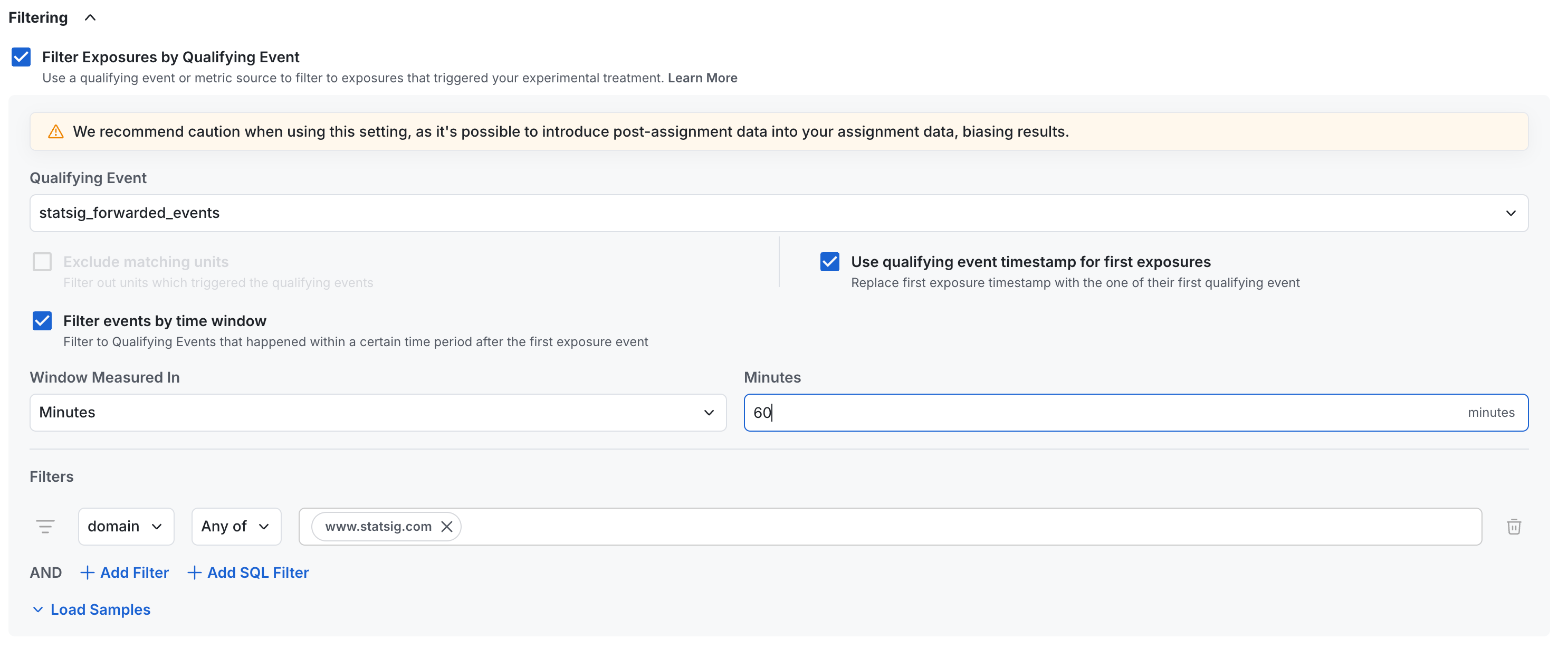 In the image above:
* We're using forwarded sdk events from Statsig to filter exposures. This could also be a single-event source or any data source
* We've chosen to replace the actual exposure timestamp with the first observed qualifying event - this will make our metric timelines and cohort timelines more accurate
* We only count qualifying events from within an hour of an exposure event - this helps to avoid issues with late-landing attribution
* We've added a filter to only include events from the `www.statsig.com` domain
Some customers prefer this flexibility, and many just set up qualifying events as individual events to plug into their analyses.
You can often identify over-exposed experiments by observing uniformly low participation rate on all metrics.
## Power Analysis
Qualifying events can be used in power analysis as a way to estimate your experimentation population by how many people historically hit your proposed trigger event.
In the image above:
* We're using forwarded sdk events from Statsig to filter exposures. This could also be a single-event source or any data source
* We've chosen to replace the actual exposure timestamp with the first observed qualifying event - this will make our metric timelines and cohort timelines more accurate
* We only count qualifying events from within an hour of an exposure event - this helps to avoid issues with late-landing attribution
* We've added a filter to only include events from the `www.statsig.com` domain
Some customers prefer this flexibility, and many just set up qualifying events as individual events to plug into their analyses.
You can often identify over-exposed experiments by observing uniformly low participation rate on all metrics.
## Power Analysis
Qualifying events can be used in power analysis as a way to estimate your experimentation population by how many people historically hit your proposed trigger event.
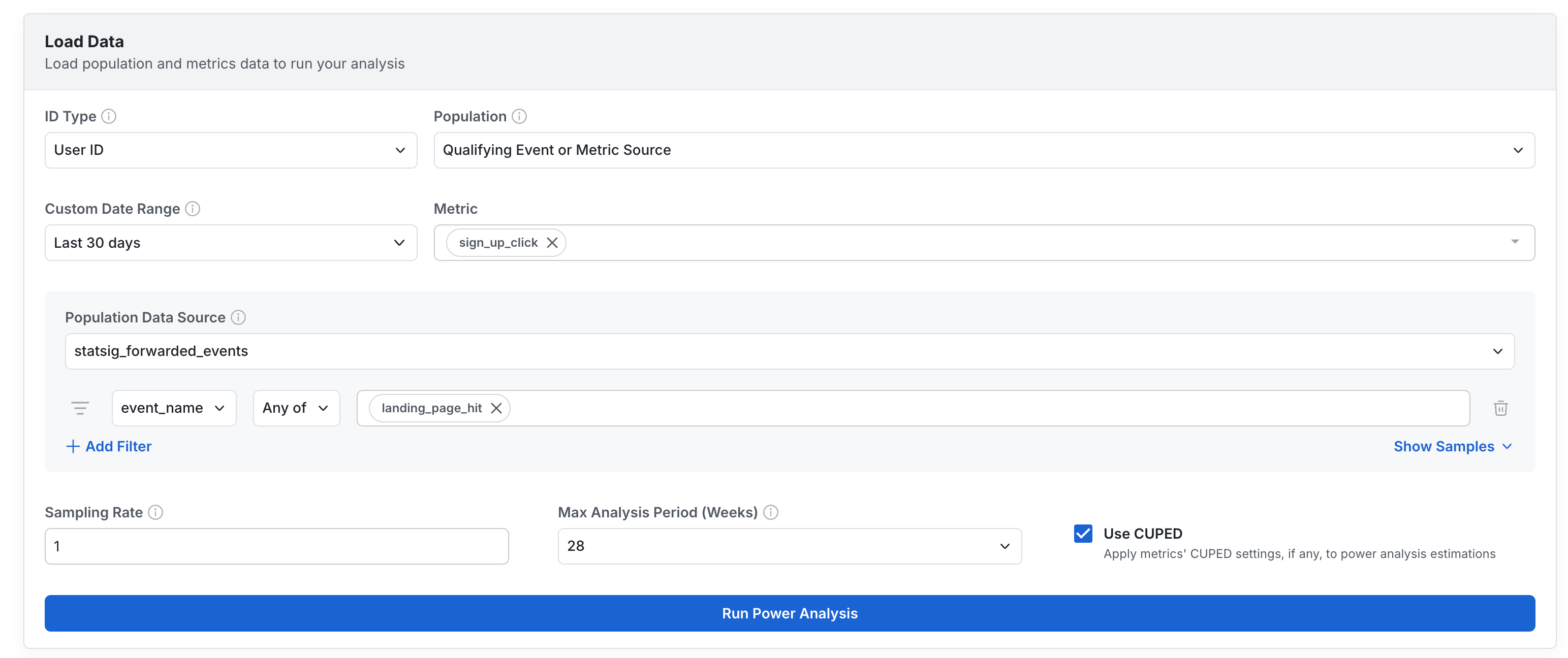 These can be filtered by event attributes, or by entity properties (e.g. users who triggered this event and are also in a segment or country).
## Example Data
| Column Type | Description | Format/Rules |
| ---------------------- | ----------------------------------------------------------------------------------------- | ------------------------------ |
| timestamp | **Required** an identifier of when the qualifying event occurred | Castable to Timestamp/Date |
| unit identifier | **Required** At least one entity to which this metric belongs | Generally a user ID or similar |
| additional identifiers | *Optional* Entity identifiers for reuse across identifier types | |
| context columns | *Optional* Fields which can be used to group by and filter results in exploratory queries | |
For example, you could pull from page load event logging directly and save it as a qualifying event called `Page Load`:
| timestamp | user\_id | company\_id | page\_route |
| ------------------- | --------------- | ----------- | ----------- |
| 2023-10-10 00:01:01 | my\_user\_17503 | c\_22235455 | / |
| 2023-10-10 00:02:15 | my\_user\_18821 | c\_22235455 | /search |
| 2023-10-10 00:03:12 | my\_user\_22251 | c\_9928 | /profile |
These can be filtered by event attributes, or by entity properties (e.g. users who triggered this event and are also in a segment or country).
## Example Data
| Column Type | Description | Format/Rules |
| ---------------------- | ----------------------------------------------------------------------------------------- | ------------------------------ |
| timestamp | **Required** an identifier of when the qualifying event occurred | Castable to Timestamp/Date |
| unit identifier | **Required** At least one entity to which this metric belongs | Generally a user ID or similar |
| additional identifiers | *Optional* Entity identifiers for reuse across identifier types | |
| context columns | *Optional* Fields which can be used to group by and filter results in exploratory queries | |
For example, you could pull from page load event logging directly and save it as a qualifying event called `Page Load`:
| timestamp | user\_id | company\_id | page\_route |
| ------------------- | --------------- | ----------- | ----------- |
| 2023-10-10 00:01:01 | my\_user\_17503 | c\_22235455 | / |
| 2023-10-10 00:02:15 | my\_user\_18821 | c\_22235455 | /search |
| 2023-10-10 00:03:12 | my\_user\_22251 | c\_9928 | /profile |